









Video Models
Sign In

MiniMax H3 Generator for Products

Describe a product action, then review its motion and sound.

CreditsCost

MiniMax H3

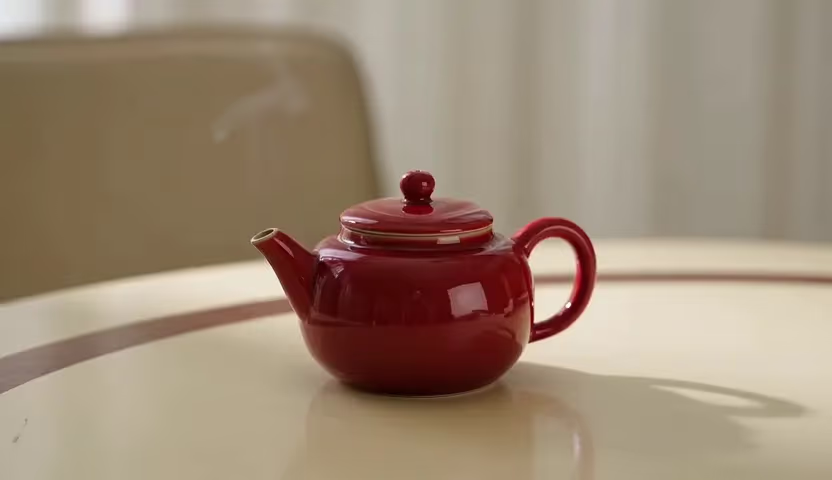
MiniMax H3: real 4-second 768P test

A small red ceramic teapot on a cream table, subtle steam drifting upward, fixed camera, soft daylight, no lettering.

Red teapot and steam generated with MiniMax H3

A Product Brief That Can Be Watched and Heard

Use MiniMax H3 on FluxKlein to turn a clearly described shot into video with sound. Begin with text, opening and closing frames, or reference images; choose 768P and 2K output with whole-second durations from 4 to 15. Validate one action before adding a longer performance or more demanding camera move. For product work, inspect package shape, material, occlusion, and the closing frame before treating an output as usable campaign material. A generated feature is not evidence that a real product has that feature.

From Product Requirements to an H3 Review Clip

Give each draft a decision to answer, an owner to review it, and a clear reason to revise or keep it.

1. Separate fixed product facts from creative choices

List what the real product actually looks like before deciding the background or camera move. If you have an approved opening photograph, use the frame workflow. If different pictures describe the product and setting, consider the separate reference workflow. Use text alone for an early invented concept, and label it as a concept rather than presenting it as a demonstration of a real item.

Open the Generator

2. Turn product requirements into an auditable shot

Write the product silhouette, real materials, and permitted changes before describing one action and its ending pose. If label text must be exact, do not combine small type, reflections, and rapid rotation in the same draft. Finish critical lettering in an editing tool. Keep a product-fact checklist beside the output and reject invented controls, impossible hinges, changing proportions, or unsupported claims before delivery.

Read the Official Prompt Guide

3. Review the smallest useful product draft

The form begins at 4 seconds, 768P, and 16:9. Watch whether the product stays grounded, the movement leaves its main feature readable, and the sound matches the intended event. Compare the opening, middle, and ending against your product checklist. Reject a convincing-looking but inaccurate result before increasing its length or output size.

Run a 4-Second Draft

4. Hand off the take with its review notes

Download the selected clip and retain its prompt, reference choices, output settings, and known defects with the project files. Tell the editor which lettering needs replacement and where a cut can safely begin or end. If the sequence needs more time, request a longer take for that specific purpose; keep the shorter draft as a comparison point.

Return to the Generator

Where an H3 Product Draft Helps the Team Decide

Use generated motion to explore presentation choices while keeping real product claims outside the model's authority.

Product material and lighting checks

Keep the camera and product position fixed while changing the key light. Inspect metal highlights, glass transparency, and fabric texture against the real sample. A plausible generated reflection is not proof of a product material.

Packaging silhouette and reveal review

Set the opening with approved product imagery and inspect caps, handles, and labels as the subject turns. Do not combine opening, spinning, and a scene change into a tiny action window. Give each take one demonstrable purpose.

Lifestyle styling before a full campaign

Explore whether a setting, hand position, or wardrobe palette complements the product. Review anatomy and the contact between the person and object, not just the overall mood. An attractive concept can inform a brief without becoming publishable evidence of a real endorsement.

Campaign cutaways and editor handoff

Plan subject placement separately for landscape web and portrait mobile delivery, leaving room for captions and buttons. Hand off the prompt, chosen ratio, action notes, and any lettering that needs replacement in post-production.

Audible cues for a campaign concept

Test whether a restrained contact sound or room ambience supports the visual rhythm. Compare the clip with sound enabled and muted during editorial review. Keep any final brand voice, factual narration, or licensed soundtrack under the team's normal approval process.

A documented comparison of campaign variants

Make one variation in background, camera direction, or lighting and note the reason for it. Compare each new clip against the same requirements. This produces a reviewable set of alternatives; it does not edit a selected region inside the original video.

Budget an H3 Draft Before Ordering a Longer Take

Decide which question the next render will answer, then check its credit quote. These examples describe base output, not a fixed price for every reference-heavy request.

4-second 768P base generation: 160 credits

For a four-second base draft, budget 160 credits at 768P or 260 at 2K. Extending to fifteen seconds raises the base amount to 600 or 975 respectively. Reference images one through five are included; each image beyond five adds 20 credits. Confirm the live quote before approving a new iteration.

Check Current Controls

Validate the direction before increasing settings

If the package changes shape, spend the next iteration on a clearer brief or better source image, not automatically on 2K. If the movement is correct but finishes too quickly, extra duration has a specific purpose. Tie each paid change to a review finding so the team can explain why another take was needed.

Check current settings

Questions Before an H3 Product Review

Resolve input choices, draft costs, and delivery limits before making a campaign version.

Can an H3 clip serve as an accurate product demonstration?

Treat it as a generated concept until a person has checked its shapes, actions, lettering, and sound against the real item. H3 can invent plausible details. A smooth-looking clip is not proof of product operation, material quality, or an advertised benefit.

Should I upload product frames or a set of reference photos?

Choose frame guidance for an agreed opening composition and, optionally, a compatible ending. Choose the separate reference mode when several images have distinct visual jobs; it accepts up to nine. The page also accepts a text-only brief, but does not expose video or audio uploads.

How do I plan the size and length for a placement?

Select a whole-second duration between 4 and 15 and either 768P or 2K. Text-led shots can use 21:9, 16:9, 4:3, 1:1, 3:4, or 9:16. Reference mode also offers Adaptive. For an image-led shot, prepare the opening photograph in the ratio you intend to use.

What should I budget for a first H3 concept?

The initial 4-second 768P base request costs 160 website credits; selecting 2K for the same duration costs 260. Additional reference images after the first five each add 20 credits. Longer takes change the total too, so use the amount beside Generate for the specific request you are about to submit.

How should a reviewer assess the generated soundtrack?

H3 can create sound together with the picture. Listen for unintended speech, mismatched contact sounds, and noise that changes the impression of the product. Include a clear sound direction in the text brief. This interface does not provide an uploaded soundtrack or voice-cloning workflow.

Should I start with 2K for a client presentation?

First decide whether the idea works at the page's 4-second, 768P, 16:9 defaults. An early review should catch product drift and a poorly timed action before requesting more pixels. Move to 2K when the output size is relevant to the next review, not as an attempted cure for a faulty concept.

Will every submission from this page use H3?

MiniMax H3 is the starting selection, but you can change it. Read the selected model and its controls before each submission, then check the completed task's model name. The page headline does not override a different choice made in the form.

Put One Product Action Up for Review

Write the feature you want viewers to notice, generate a short H3 concept, and assess its picture and sound against your brief.

H3 Controls for a Reviewable Product Shot

Choose inputs and output settings according to the decision your team needs to make about the shot.

A written brief for picture and sound

Turn a merchandising requirement into one visible event: a cup placed on a counter, a lid settling, or light moving over a surface. Describe any contact sound beside that event. A plausible soundtrack can strengthen a concept, but it must not imply a mechanism or product benefit that the real item does not have.

An approved opening and an intended ending

Use one opening image when the starting product layout is already agreed. Add a compatible closing image when the ending pose matters to the edit. Image-to-video takes its framing from the source image, so prepare that image for the placement you need; this mode does not offer an independent aspect-ratio setting.

A reference set with separate responsibilities

Reference mode accepts up to nine images. One could establish packaging, another the tabletop, and another the light direction. Record what each picture contributes and remove contradictory versions of the same product. Treat the result as a new interpretation to inspect, not an exact reconstruction of those source photographs.

Length matched to an editorial beat

The duration selector covers every whole second from 4 to 15. Use four seconds to decide whether a single movement communicates the intended idea. Reserve extra time for a specific pause, gesture, or sound event rather than filling a longer clip with unrelated actions that make approval harder.

Draft detail before delivery detail

At 768P, first decide whether the package shape and movement are usable. The 2K option provides a larger output for subsequent review, but cannot turn an invented label or distorted hinge into an accurate one. Check the new credit requirement whenever you change the resolution or duration.

Composition planned for its placement

Text-led concepts offer 21:9, 16:9, 4:3, 1:1, 3:4, and 9:16. Reference mode adds Adaptive; image-led clips inherit the opening image ratio. Choose the destination before composing the shot so that a web banner, square tile, or vertical placement does not require an awkward crop afterward.

Write an H3 Brief a Reviewer Can Check

Use these fields to define one continuous product shot. For a sequence of separate shots, write separate briefs and assemble the chosen takes in an editor.

Non-negotiable product features

Name the visible silhouette, closure, handle, surface finish, and major color areas. Distinguish details taken from an approved reference from details you are deliberately inventing for a concept. That distinction gives the reviewer a concrete acceptance checklist.

A beginning, a movement, and a hold

Explain how the product starts, what moves, and where it should settle. Leave a short visual pause when an editor needs room for a cut or caption. Make the requested timing plausible within the selected 4–15 seconds instead of compressing an entire demonstration into one take.

A camera move that reveals something

Choose a fixed close-up to inspect a closure or a slow lateral move to reveal surface texture. State whether the product or the camera moves. Combining an orbit, a zoom, and a rotating object can hide the very detail the shot was supposed to explain.

Materials under a consistent light

Specify the backdrop and a clear light direction, then say how glass, metal, or fabric should respond. Avoid a list of conflicting lighting styles. Evaluate generated highlights against the real material before using the result to illustrate a product's finish.

Sound that belongs to the visible event

Request a quiet room tone, a gentle placement sound, or a clearly attributed short line when it serves the brief. Review the whole soundtrack for unintended speech or exaggerated mechanical sounds. Generated audio should not imply unsupported product performance.

What would make the take unusable

Write concrete rejection conditions such as a second handle, an opening that changes shape, extra products, unreadable lettering, or a cut away from the approved setup. Exclusions communicate priorities; they do not guarantee that the model will satisfy every constraint.

Product-shot prompt example

“An unbranded brushed-metal travel cup on a pale grey counter. The camera slides slowly right from the front, keeping the lid and body proportions stable. A soft side light reveals the brushed texture; end on a three-quarter view. Quiet room ambience, no lettering.” Check the lid, handle if present, and contact with the counter before making the move longer or adding another object.

MiniMax H3 vs Other FluxKlein Video Models

Compare the controls your assignment needs: picture-and-sound direction, longer timing, or an explicit audio switch. Judge actual takes against the same product checklist.

Keep H3 in the picture-and-sound shortlist

H3 gives you a short audiovisual concept from a written brief, frame guidance, or reference images. Use its four-second 768P starting point to check an idea involving both movement and a sound event. Select a take because it fits the brief, not because the model name implies universal superiority.

Generate with H3

Compare speed, style, and specialist workflows

Select another workflow from this site’s video-model hub and compare action, framing, sound, input mode, and clip length using the same core brief. Record why a take was selected so a teammate can review that decision later.

View All Video Models

Compare with Seedance 2.5

For clips longer than fifteen seconds, compare the duration choices on Seedance 2.5. Start with the same short brief and inspect motion and framing before extending the scene.

Open Seedance 2.5

Compare with Kling O3

Compare Kling O3 when an explicit audio switch or a frame-guided short shot fits the brief. Keep framing and action requirements the same and inspect each result without assuming either model always performs better.

Open Kling O3